Introduction
Your production server crashes at 2 AM on a Sunday. Your entire application goes offline. Customers can't access your service. Your team gets paged awake. By the time the server reboots 20 minutes later, you've lost ₹50 lakhs in transactions and your reputation is damaged.
This shouldn't happen in 2026.
High Availability (HA) and Disaster Recovery (DR) are the practices and technologies that ensure your application keeps running even when components fail. They're not optional for any business-critical system.
Yet most applications are built without HA and DR from the start. When the crash happens — and it will — the damage is catastrophic.
This guide explains what high availability means, how to architect systems that don't have single points of failure, how to plan for disasters, and how to ensure your business survives component failures.
The Cost of Downtime
Downtime isn't just an inconvenience. It's an existential business threat:
- Revenue loss — every minute of downtime is revenue not captured. For a SaaS application, 1 hour of downtime might cost ₹10 lakhs.
- Reputation damage — customers lose trust. One catastrophic outage can trigger mass churn.
- Regulatory penalties — many compliance frameworks (GDPR, HIPAA, PCI-DSS) mandate uptime SLAs. Miss them and face fines.
- Emergency response costs — on-call engineers, expedited fixes, infrastructure scaling — all expensive and stressful
- Data loss — if your database is destroyed and you have no backup, you've lost customer data. That's a catastrophe.
A small investment in HA and DR prevents these costs entirely.
What Is High Availability (HA) — And Why It Matters
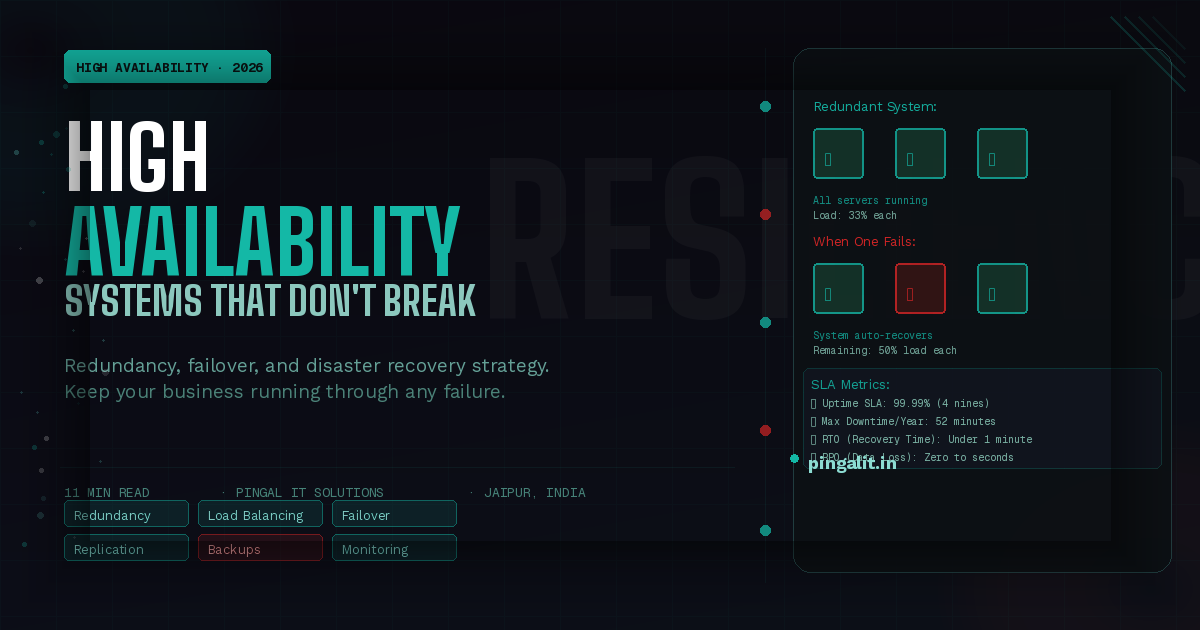
High Availability means your application keeps running even when parts fail. Explicitly: your system can tolerate the failure of any single component without becoming unavailable to users.
Single Points of Failure
A single point of failure is any component that, if it fails, brings down the entire system. Examples:
- One web server (if it crashes, your app is down)
- One database (if it fails, your app can't serve requests)
- One load balancer (if it fails, traffic can't reach your servers)
- One internet connection (if it goes out, your app is unreachable)
Highly available systems have redundancy: multiple web servers, database replicas, multiple load balancers, multiple internet connections.
The 9s of Availability
Uptime is measured in "nines":
| Nines | Uptime % | Downtime/Year | Typical For |
|---|---|---|---|
| 2 nines (99%) | 99% | 3.6 days | Hobby projects, non-critical systems |
| 3 nines (99.9%) | 99.9% | 8.6 hours | Standard web applications |
| 4 nines (99.99%) | 99.99% | 52 minutes | Critical business systems, SaaS |
| 5 nines (99.999%) | 99.999% | 5 minutes | Mission-critical systems (banks, healthcare) |
Most SaaS businesses target 4 nines (99.99%) uptime. This requires serious HA infrastructure but is achievable with proper design.
Architecture Patterns for High Availability
1. Load Balancing
Distribute traffic across multiple application servers. If one server fails, the load balancer routes new requests to others. Existing requests on the failed server time out; the user retries and succeeds.
Tools: Nginx, HAProxy, AWS ELB, Google Cloud Load Balancer
2. Database Replication
Maintain a primary database and read replicas. Writes go to the primary; reads can go to replicas. If the primary fails, promote a replica to primary. This keeps data available and distributes read load.
Types:
- Master-slave — one primary, multiple read-only replicas
- Master-master — multiple primaries, each replicates to others (risky; can cause data conflicts)
- Multi-region — replicate across geographical regions for disaster recovery
3. Clustering and Failover
Group components (databases, caches, message queues) into clusters. If one node fails, the cluster continues operating. Failover happens automatically.
Tools: Kubernetes, Consul, etcd
4. Redundant Infrastructure
Multiple internet connections (from different ISPs). Multiple data centers in different regions. Multiple CDNs for content delivery. Redundancy at every level.
5. Health Checks and Automated Recovery
Continuously monitor component health. If a server fails health checks, automatically remove it from the load balancer and potentially spawn a replacement. This happens without human intervention.
Tools: Kubernetes, Docker Swarm, AWS Auto Scaling
What Is Disaster Recovery (DR) — And Why It's Different From HA
High Availability handles component failures (a server dies, a disk fails). The system recovers in seconds/minutes.
Disaster Recovery handles catastrophic failures (entire data center destroyed, region-wide outage, ransomware, human error deletes all data). Recovery takes hours/days and requires pre-planned procedures.
RTO and RPO — The Metrics That Matter
- RTO (Recovery Time Objective) — how long until the system is back online after a disaster? For critical systems, this should be under 1 hour.
- RPO (Recovery Point Objective) — how much data are you willing to lose? If your RPO is 1 hour, losing the last hour of data is acceptable. If it's 5 minutes, you need more frequent backups.
These define your DR strategy:
- RTO 1 hour, RPO 5 minutes — very expensive; requires multi-region failover and frequent backups
- RTO 4 hours, RPO 1 hour — moderate cost; requires automated backups and recovery procedures
- RTO 24 hours, RPO 24 hours — cheap; manual recovery from daily backups
Disaster Recovery Strategies
1. Backup and Restore
Regular backups stored in geographically separate locations. In case of disaster, restore from the most recent backup. This is slow (could take hours) but cheap.
RTO: 4-24 hours | RPO: depends on backup frequency
2. Warm Standby
Maintain a secondary system that's kept in sync but not actively serving production traffic. In case of primary failure, switch to the secondary.
RTO: 15-60 minutes | RPO: minimal (seconds to minutes)
3. Hot Standby (Active-Active)
Multiple systems actively serving traffic, each a complete replica of the other. If one fails, traffic automatically redirects to others. No downtime.
RTO: seconds | RPO: seconds
This is expensive but essential for mission-critical systems.
4. Multi-Region Failover
Your primary system runs in region A. If region A experiences an outage, DNS automatically points to region B. This handles regional disasters (entire data center destroyed).
RTO: 1-5 minutes (DNS propagation time) | RPO: seconds
Building a Disaster Recovery Plan
1. Identify Critical Assets
Which systems must keep running? For most businesses: the production database, the API, and customer-facing services. Define your RTO and RPO for each.
2. Backup Strategy
- Daily full backups of databases, stored in geographically separate locations
- Hourly or more frequent incremental backups
- Test restores regularly (6 months passing without testing means you don't know if backups work)
- Immutable backups (can't be deleted by ransomware)
3. Redundancy
- Multiple application servers behind a load balancer
- Database replicas in multiple regions
- Multiple internet connections
- CDN for static assets
4. Failover Testing
- Regular disaster recovery drills (monthly or quarterly)
- Simulate region failures and test recovery procedures
- Document what went wrong and improve procedures
- Chaos engineering — intentionally break components to find failures
5. Runbooks and Documentation
- Step-by-step procedures for recovering from specific failures
- Who to call, what to do, in what order
- Keep runbooks updated and accessible
6. Monitoring and Alerting
- Continuous monitoring of all critical systems
- Alerts for failures or degradation
- Dashboards showing system health
- Automated failover when possible
Common HA/DR Mistakes
Mistake 1: Assuming Backups Work Without Testing
A backup that's never been restored is just a file taking up storage. Test restore procedures regularly.
Mistake 2: Single Points of Failure You Don't Know About
Your load balancer is redundant. Your servers are redundant. But your DNS provider only has one server? Disaster. Audit your entire infrastructure for single points of failure.
Mistake 3: Backup Stored Locally
If your data center burns down, a backup stored in the same data center is useless. Store backups geographically far away.
Mistake 4: Untested Failover
Your failover procedure looks good on paper. But nobody's tested it. When the real failure happens, it doesn't work. Test failover regularly.
Mistake 5: Ignoring Monitoring
You won't know your system has failed until customers complain. Monitoring alerts you immediately so you can respond before it becomes a disaster.
Technology Stack for HA/DR
| Layer | Tools | Purpose |
|---|---|---|
| Load Balancing | Nginx, HAProxy, AWS ELB | Distribute traffic across servers |
| Database Replication | PostgreSQL streaming replication, MySQL binlog replication | Replicate data across servers/regions |
| Clustering | Kubernetes, Consul, etcd | Manage cluster membership and failover |
| Backup & Recovery | Velero, AWS Backup, Barman (for PostgreSQL) | Automated backup and restore |
| Monitoring | Prometheus, Grafana, DataDog, PagerDuty | Monitor systems and alert on failures |
| DNS Failover | Route53, CloudFlare, Geolocation routing | Failover between regions at DNS level |
How Pingal IT Solutions Builds High Availability Systems
At Pingal IT Solutions, every production system we build includes HA and DR from the start. It's not an afterthought. Our approach:
- Redundancy at every layer — multiple servers, replicated databases, failover systems
- Automated failover — when components fail, the system recovers automatically
- Comprehensive monitoring — we know about failures before users do
- Regular DR drills — we test disaster recovery procedures quarterly
- Geographically distributed backups — backup in multiple regions for true disaster recovery
- RTO/RPO defined upfront — we build the infrastructure to meet your uptime requirements
Our HA/DR services include:
- HA architecture design and implementation
- Load balancing setup and configuration
- Database replication and failover
- Multi-region deployment strategy
- Backup and disaster recovery planning
- Monitoring and alerting implementation
- Failover testing and runbook development
Conclusion
Downtime is not a matter of if, but when. Every system fails eventually. The question is whether your business survives the failure or whether the downtime destroys you.
High Availability and Disaster Recovery aren't luxuries. They're insurance policies. Build them in from the start. The cost of adding HA after launch is 5-10x higher than building it in initially.
Is your system prepared for failure? Talk to Pingal IT Solutions — we'll audit your HA/DR readiness and design a strategy that protects your business.